
Your sales team spends hours every day scrolling LinkedIn, manually updating CRM records, and writing follow-up emails nobody reads. That’s not an exaggeration: according to McKinsey, B2B sales reps spend less than 30% of their time actually selling. Administrative tasks eat the rest.
AI changes that — but not the way most articles describe it. No single tool solves everything. No algorithm replaces sales instinct. What AI can do: automate the complete process from first signal detection to the fifth follow-up to the point where your team focuses exclusively on conversations that actually close.
This guide builds the full funnel from start to finish — concrete, with real numbers, and GDPR-compliant.
The Problem: Where Sales Time Actually Goes
Before we talk solutions, it’s worth an honest look at the numbers:
- 60–70% of sales time goes to non-selling activities (research, data entry, coordination)
- The average SDR spends 6–8 hours per week on manual company research alone
- Only 2% of cold emails get a reply — signal-based outreach achieves 5–8%
- 44% of reps give up after the first follow-up — yet it takes an average of 5–7 touchpoints to book a meeting
The problem isn’t lack of effort. It’s the wrong system.
The AI Sales Funnel: All Three Phases at a Glance
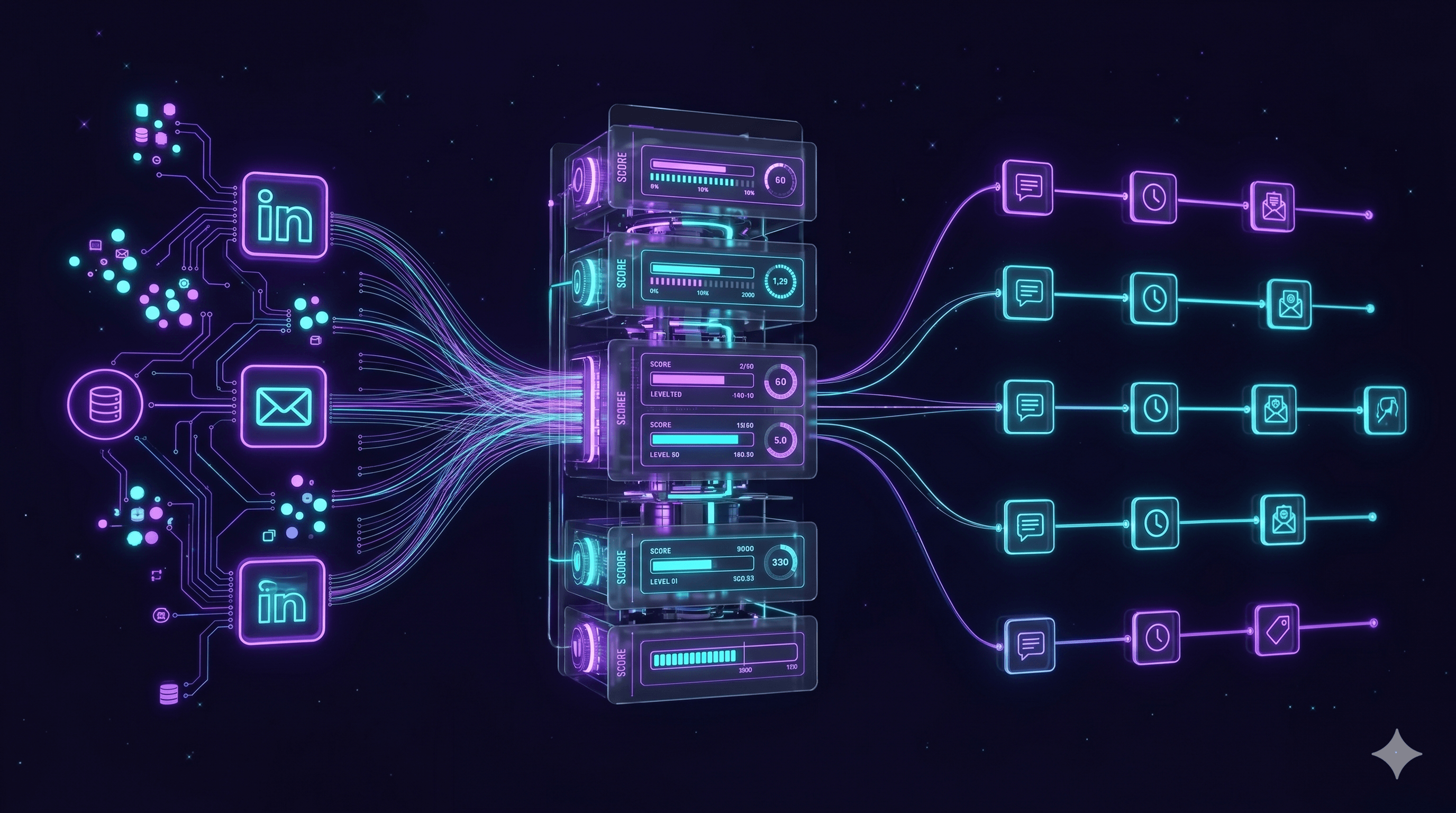
A fully AI-powered sales process consists of three clearly defined phases that flow seamlessly into each other:
PHASE 1: FIND LEADS
Detect signal → Identify company → Enrich contact
         ↓
PHASE 2: QUALIFY
Calculate lead score → Extract MEDDIC criteria → Set priority
         ↓
PHASE 3: FOLLOW UP
Launch sequence → Classify response → Hand off to human / next step
What matters in practice: every phase must be connected to the next. A well-configured scoring model is useless if your follow-up sequence runs independently. The integration is the actual lever.
Phase 1: Finding Leads with Intent Signals
What Are Intent Signals?
Intent signals are digital footprints that reveal when a company is actively trying to solve a problem — often before they’ve spoken to a single vendor. Spotting these signals early means reaching prospects when their buying readiness is at its peak.
The 12 Most Important Intent Signal Types — With Weighting and Expiry Time
This is the detail that sets this guide apart from everything else out there: not all signals are equal, and not all signals stay relevant equally long.
| Signal Type | Example | Weight | Expiry | Tool |
|---|---|---|---|---|
| Funding round | Series B closed | ⭐⭐⭐⭐⭐ | 90 days | Crunchbase, Clay |
| C-level hire | New CTO announced | ⭐⭐⭐⭐⭐ | 60 days | LinkedIn Sales Nav, Clay |
| Tech job posting | Hiring a “Cloud Architect” | ⭐⭐⭐⭐ | 30 days | Google Jobs API, SerpApi |
| Tech stack change | Migrating from Salesforce to HubSpot | ⭐⭐⭐⭐ | 60 days | Builtwith, Clay |
| Competitor interaction | G2 review of a rival product | ⭐⭐⭐⭐ | 21 days | Bombora, G2 Intent |
| Company expansion | New office location announced | ⭐⭐⭐ | 45 days | Press releases, Clay |
| LinkedIn pain signal | CTO posts about “legacy system struggles” | ⭐⭐⭐ | 14 days | LinkedIn Sales Nav |
| Content download (own site) | Downloaded your whitepaper | ⭐⭐⭐ | 21 days | HubSpot, Matomo |
| Pricing page (repeated visits) | 3+ visits within one week | ⭐⭐⭐ | 7 days | HubSpot, Plausible |
| Third-party intent data | Searching your solution category | ⭐⭐ | 14 days | Bombora, G2 Intent |
| Industry event attendance | Registered for a relevant conference | ⭐⭐ | 30 days | Eventbrite, Dealfront |
| Social media engagement | Comment on a relevant post | ⭐ | 7 days | LinkedIn, Hootsuite |
Dealing With False Positives
The biggest challenge in intent-based outreach: not every page visit is a buying signal. A competitor checks your pricing page. A student researches for a paper.
Three filter rules for clean signals:
- Check company fit: Does the company match your ICP (Ideal Customer Profile)?
- Keep time windows tight: A pricing page visit from 14 days ago is no longer a hot signal
- Require signal stacking: No outreach on a single signal rated below ⭐⭐⭐
Tool Comparison: What Detects What?
| Tool | Strength | GDPR-Compliant (EU) | Price/Month |
|---|---|---|---|
| Clay | Data aggregation + AI enrichment | With EU instance | from $149 |
| Apollo.io | Contact database + sequences | Limited | from $49 |
| LinkedIn Sales Navigator | Social signals + company data | Yes | from $99 |
| Bombora | Third-party intent data | Yes (EU data) | on request |
| Dealfront (ex-Echobot) | DACH market, GDPR-native | Yes, DE servers | from €499 |
| SerpApi | Job posting scraping | Yes | from $50 |
Phase 2: Qualify Automatically — Beyond BANT
Why BANT Doesn’t Cut It in 2026
BANT (Budget, Authority, Need, Timeline) was developed by IBM in the 1960s — for a world without CRM, social media, or data. The framework has a fundamental flaw: it asks what a lead has, not what they need.
Modern B2B buying is far more complex:
- According to Gartner, 6–10 people are involved in the average B2B purchase decision
- Budget is rarely the actual barrier — internal political will usually is
- “Authority” is almost never a single person
MEDDIC (Metrics, Economic Buyer, Decision Criteria, Decision Process, Identify Pain, Champion) solves these weaknesses — and AI can populate most criteria automatically.
How AI Extracts MEDDIC Criteria Automatically
This is the step no competitor explains: AI reads emails, meeting notes, and CRM entries and populates MEDDIC fields automatically.
Real-world example:
A prospect writes: “We’re struggling with our sales team not knowing which leads to prioritize. Our CFO has given us until Q3 to fix it. We’re already on HubSpot, but it’s not enough.”
AI automatically extracts:
MEDDIC Extraction:
✅ Metrics: Sales efficiency / lead prioritization (missing)
✅ Economic Buyer: CFO (identified)
✅ Decision Criteria: HubSpot integration required
✅ Decision Process: Internal deadline Q3
✅ Identified Pain: No lead prioritization system
⬜ Champion: Not yet identified
This automatic parsing runs with modern LLMs (GPT-4o, Claude) as part of an n8n or Make workflow. The output lands directly in the CRM record.
Predictive Lead Scoring: How to Configure It Right
A lead score is built from two components:
Firmographic Score (who is the lead?):
- Company size: matches ICP? (+10 to +30 points)
- Industry: target vertical? (+5 to +20 points)
- Tech stack: uses compatible tools? (+10 points)
- Location: target region? (+5 points)
Behavioral Score (what is the lead doing?):
- Intent signal combination (per table above): +10 to +50 points
- Own website interaction: +5 to +25 points
- Email opens and clicks: +3 to +10 points
- Demo request or content download: +25 points
Score thresholds:
- 0–29: Nurturing (automated content, no active outreach)
- 30–59: Warm Lead (start automated sequence)
- 60–79: Hot Lead (sequence + SDR notification)
- 80+: Immediate personal outreach by senior sales
Phase 3: Follow Up Automatically — and Legally
The GDPR Question: What’s Allowed?
This is the section no other English-language article addresses for the German-speaking market — even though it’s the most important question in European B2B outreach.
Legal basis for automated B2B outreach in Germany:
The Act Against Unfair Competition (UWG § 7) and GDPR Art. 6 Para. 1 lit. f (legitimate interest) apply in parallel. The good news: in the B2B context, cold email outreach is permitted without prior consent under specific conditions.
Permitted (§ 7 Para. 3 UWG + legitimate interest):
- Email to a business address (not a private person)
- Your product/service is relevant to the recipient’s business
- Clear sender identification (no pseudonyms)
- Easy unsubscribe option in every email (mandatory)
- No deception about the commercial purpose
Not permitted:
- Repeated contact after an explicit opt-out request (immediate obligation to block)
- Purchasing email lists without proof of GDPR-compliant origin
- Automated personalization using sensitive data (health, religion, etc.)
- WhatsApp or SMS without explicit consent
What every automated email must include:
- Full legal notice (name, address, VAT ID)
- One-click unsubscribe link (no confirmation required)
- Brief statement of why you’re reaching out (legitimate interest)
- No misleading subject lines
A Complete Follow-Up Sequence With Decision Logic
Here’s the concrete workflow no competitor shows:
Day 0 — First Contact Email
- Trigger: Lead score ≥ 60
- Personalization: Reference the intent signal (e.g., “I noticed you’re currently hiring a Cloud Architect…”)
- Length: 5 sentences maximum
- CTA: Short calendar link (Calendly/Cal.com)
→ If reply (positive): Hand off to SDR, pause sequence
→ If reply (negative/unsubscribe): Stop sequence immediately, flag contact
→ If no reply: Continue to Day 3
Day 3 — Value Email
- Content: Short case study or stat that addresses the lead’s pain
- No pitch — deliver value only
- CTA: Link to supporting content (article, checklist)
→ If click on content: Score +15, notify SDR
→ If no engagement: Continue to Day 7
Day 7 — Direct Question
- Content: Short, honest question: “Is [topic] currently on your agenda?”
- Offer two reply options (yes / not right now)
- Shortest email in the sequence (3 sentences)
→ If “Yes”: SDR notification + automatic calendar link
→ If “Not right now”: Set reactivation trigger for 30 days
→ If no reply: Continue to Day 14
Day 14 — Social Proof
- Content: Reference from the same industry
- If possible: logo, quote, concrete result
- CTA: “Want me to show you how we did this for [industry]?”
→ If engagement: Hand off to SDR
→ If no reply: Continue to Day 21
Day 21 — Break-Up Email
- Content: “This is my last email on this topic — if you ever have a need down the road, I’d love to hear from you.”
- No pitch, no question, no pressure
- In practice, this email consistently generates a disproportionate number of replies
→ After this: Move contact to nurturing list (newsletter, content)
The n8n Workflow: What This Looks Like Technically
[Trigger: HubSpot lead score ≥ 60]
         ↓
[Enrich company data via Clay API]
         ↓
[Read intent signal from database]
         ↓
[Generate email copy via Claude/GPT]
(Personalization: company name, signal, industry)
         ↓
[Send via Smartreach/Lemlist]
         ↓
[Wait for webhook: reply / click / unsubscribe]
    ↙         ↓           ↘
[Positive]  [Neutral]  [Unsubscribe]
[→ SDR]   [→ Day 3]  [→ STOP + CRM flag]
This workflow runs fully automatically — with one important exception: every email generated by Claude or GPT should go through a quality gate during initial rollout. Review 50+ emails manually first. Only switch to fully automated mode once quality is consistently on point.
ROI: When Does AI in Sales Pay Off?
Everyone talks about ROI percentages. Here are concrete numbers for three typical company sizes:
| Small Team (2 SDRs) | Mid-Market (5 SDRs) | Scaling (10 SDRs) | |
|---|---|---|---|
| Manual leads/month | 200 | 500 | 1,000 |
| With AI system | 800 | 2,500 | 6,000 |
| Current cost/lead | ~$85 | ~$70 | ~$55 |
| With AI system | ~$9 | ~$6 | ~$3.50 |
| Implementation cost | $3,500–$9,000 | $9,000–$22,000 | $22,000–$45,000 |
| Monthly tool costs | $450–$900 | $900–$1,700 | $1,700–$3,300 |
| Break-even | Month 3–5 | Month 2–4 | Month 2–3 |
Note: These figures are based on project experience in the DACH market. Results will vary by industry, data quality, and target ICP. What matters most isn’t the absolute ROI number — it’s the baseline: how many qualified conversations does your team produce per week today, and how many could be possible?
The 6 Most Common Mistakes — and How to Avoid Them
These are the mistakes we see in almost every project that comes to us:
1. Garbage In, Garbage Out
AI cannot fix bad CRM data. If 40% of your contacts have outdated email addresses, your bounce rate will explode and your sender reputation will take a hit that’s hard to recover from. Clean the data first, then automate.
2. Lead Scoring Without a Feedback Loop
A scoring model that’s never recalibrated gets worse over time. Review weekly: which leads with a score of 70+ actually converted? Which didn’t? Adjust thresholds accordingly.
3. Sequence Keeps Running After a Deal Is Closed
The nightmare scenario: an existing customer gets a cold outreach email. Technical requirement: sync CRM status and exclude all “Won” or “Customer” contacts from active sequences.
4. Too Many Signals, Not Enough Filtering
The tool flags 200 “hot” leads per week. The team ignores the alerts because 90% are false positives. Better: 20 genuinely relevant leads beats 200 noise signals every time.
5. AI-Generated Emails Sound Like AI
”I hope this email finds you well” is not a strong opener. Prompting is a craft. Your emails need to sound like you — not like a generic AI assistant.
6. The Team Doesn’t Trust AI Scores
”My gut says something different” is a valid objection, not just pushback. Fix: make the scoring model transparent. Show which signals contributed to the score. People follow recommendations they can understand.
FAQ
How many follow-up emails are legally allowed in B2B outreach?
There’s no legally mandated maximum number, as long as a simple opt-out mechanism is included and each email has a legitimate business connection. In practice, we recommend a maximum of 5 touchpoints per sequence — after that, the attrition effect outweighs any potential upside.
What’s the difference between BANT and MEDDIC in B2B sales?
BANT (Budget, Authority, Need, Timeline) checks whether a lead can theoretically buy. MEDDIC (Metrics, Economic Buyer, Decision Criteria, Decision Process, Identified Pain, Champion) maps how a purchase decision is actually made inside the organization. For complex B2B deals with multiple stakeholders, MEDDIC is significantly more precise.
How long does an intent signal stay valid?
It depends on the signal type. Funding signals remain relevant for 90 days. Job postings for 30 days. Pricing page visits only 7 days. After expiry, the signal should be removed from the active score to avoid stale prioritization.
When does an AI sales system start paying off?
Rule of thumb: with 2 SDRs and at least 200 manually researched leads per month, break-even typically happens within 3–5 months. What matters more than team size is CRM data quality and clarity on your target ICP.
What tool is best for automated follow-up sequences?
For teams that prioritize flexibility and control, a custom-built n8n workflow is the most cost-effective option. For teams that want an out-of-the-box solution, Lemlist or Smartreach work well for sequences, combined with Clay for data enrichment.
Is automated cold emailing legal in the US?
Yes, under CAN-SPAM and applicable state laws, B2B cold email is permitted with clear sender identification, a physical address, and a functional opt-out mechanism honored within 10 business days. For prospects in EU countries, GDPR rules apply regardless of where your company is based.
How do I know if my lead scoring is working?
Measure the conversion rate by score tier weekly: how many leads with a score of 60–79 convert to meetings? How many at 80+? If the difference isn’t significant, the model is off. A well-configured scoring model should show at least three times higher conversion rates for hot leads (80+) compared to warm leads (30–59).
Can AI also automate upsell and cross-sell outreach to existing customers?
Yes — and often with better ROI than cold outreach. Upsell and cross-sell triggers can be derived from CRM data (last purchase, usage intensity, support tickets). The advantage: you already have a relationship and validated data. Legal barriers are lower because an existing customer relationship serves as the legal basis for contact.
The Bottom Line: The System Beats the Tool
Anyone searching for the one AI tool that solves everything will be disappointed. What works is a system: clear intent signal detection, properly configured lead scoring, legally compliant sequences, and clear rules for when humans step in.
Companies that build this system correctly report $3.50–$9 cost per qualified lead (versus $55–$85 manually) and 5–8% reply rates on signal-based outreach (versus 1–2% industry average).
The technical build is solvable — the hard part is almost always cleaning the data and aligning on a shared ICP definition. Once you know exactly who you’re trying to reach, AI can handle the rest.
Want to know what an AI sales system would look like for your specific setup? Talk to us — in a 30-minute call, we’ll show you what’s possible in your environment.