
“Build your own AI” — what does that actually mean?
More and more businesses are asking the same question: How do I build an AI solution that actually fits my workflows instead of forcing me to adapt to it? The answer surprises most people: in the majority of cases, you need neither a development team nor a seven-figure budget.
The phrase “build your own AI” gets used to describe four completely different things — and nearly every article online blurs these levels together. That leads to misaligned expectations, wasted money, and failed projects.
A retail company that wants its customer service chatbot to know its product catalog has a fundamentally different need than a financial services firm building a proprietary risk model. Both want “their own AI” — but the right solution is miles apart.
This article maps out all four realistic approaches clearly — from no-code and low-code to full model training — with concrete cost figures, a data privacy compliance check, and a decision matrix for small and mid-sized businesses.
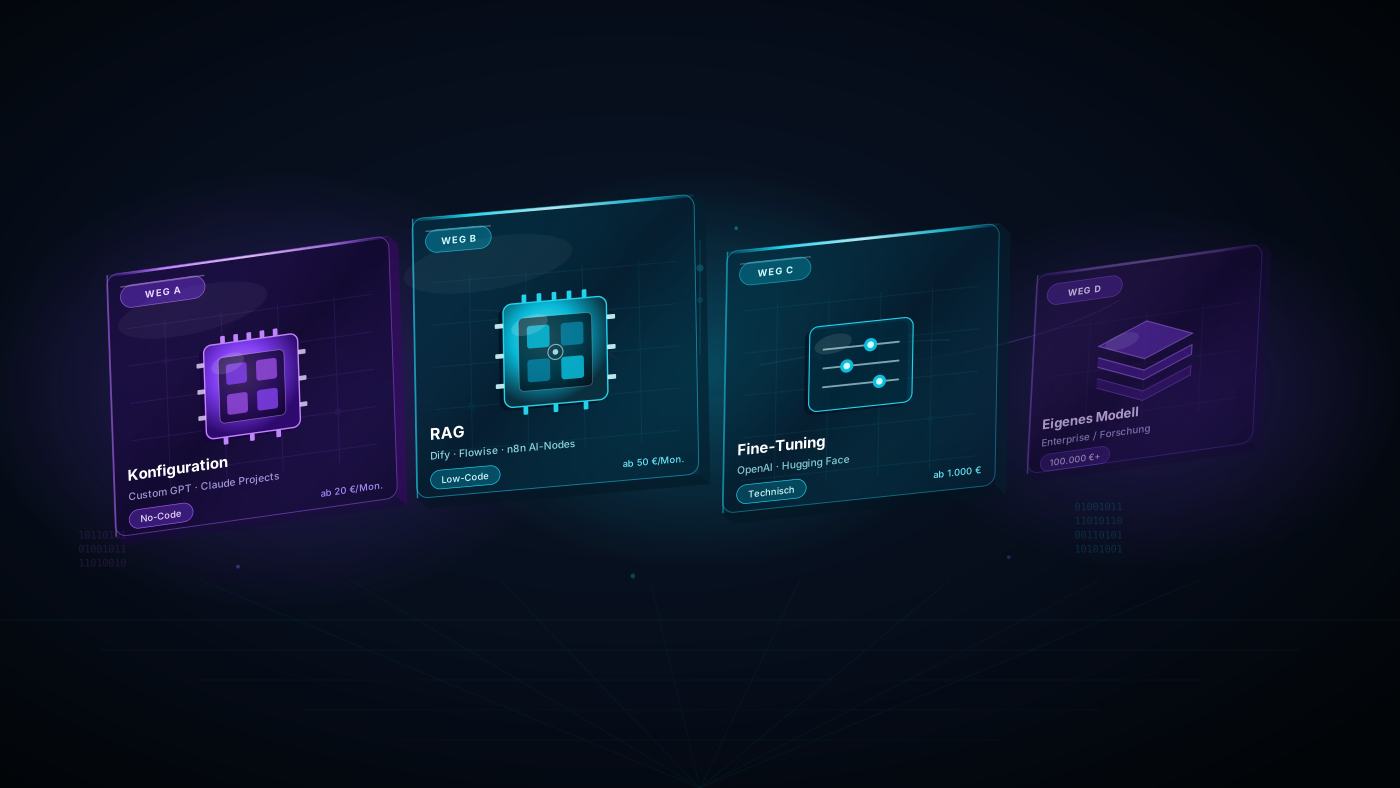
The 4 ways to build your own AI — quick reference
| Approach | What it is | Effort | Cost | Best for |
|---|---|---|---|---|
| A: Configuration | Customize a generative AI with instructions | Hours | $0–$60/month | All SMEs |
| B: RAG (Low-Code) | Feed your own documents as a knowledge base | Days | $60–$600/month | SMEs with a knowledge base |
| C: Fine-Tuning | Additional training on your own data | Weeks | $600–$6,000 one-time | Specific language/style needs |
| D: Train from scratch | Build an AI model from the ground up | Months–years | $100,000+ | Enterprise / Research |
Approach A: Configure a generative AI — the most underrated no-code solution
The simplest and most consistently underestimated path to a custom AI solution for your business: take an existing generative AI model like ChatGPT or Claude, and give it a distinct identity, tone, and behavior rules through a system prompt.
What that looks like in practice:
- The AI always speaks in your company’s voice
- It knows your products, pricing, and most common customer questions
- It follows your escalation rules and introduces itself with a consistent name
- It refuses to answer questions outside its defined scope
Practical no-code tools:
- ChatGPT Custom GPTs (OpenAI): Fully configurable with no technical knowledge required
- Claude Projects (Anthropic): Persistent context memory for entire teams
- Microsoft Copilot Studio: Purpose-built for companies already in the Microsoft ecosystem
Generative AI examples for SMEs:
- A sales assistant that drafts proposals in your company’s tone and language
- An HR bot that knows your internal policies and answers employee questions
- A marketing assistant that maintains a consistent brand voice across every channel
Cost: $20–$60/month (ChatGPT Plus or Claude Pro subscription)
Approach B: RAG — low-code AI with your own knowledge base
RAG stands for Retrieval-Augmented Generation: instead of relying solely on what the model was trained on, the AI actively searches your own documents with every query and responds based on those sources. This is the most impactful low-code approach for SMEs that want to turn internal documents, manuals, or databases into a live AI knowledge base.
The result: a generative AI that genuinely knows your product manuals, internal processes, contracts, or FAQ databases — and cites them precisely instead of hallucinating.
What you can build with RAG:
- Internal knowledge assistant (HR, compliance, product knowledge)
- Customer-facing chatbot that knows your documentation inside and out
- Contract assistant that locates and quotes relevant clauses
- Support bot with access to your full ticket history
Low-code and no-code RAG tools:
- Dify.ai: Visual builder, upload your documents, deploy directly — no code
- Flowise: Open-source, self-hostable, strong data privacy posture
- n8n with AI nodes: Ideal for companies already using n8n for workflow automation
- Microsoft Azure AI Search + Copilot: For Microsoft-first environments
When Approach B makes sense:
- You have substantial internal knowledge documents
- Employees spend time every day manually searching manuals, catalogs, or wikis
- Your customer service team answers the same questions repeatedly
Cost: $60–$400/month ongoing, $600–$2,500 setup
Approach C: Fine-tuning — when off-the-shelf models fall short
Fine-tuning means taking an existing generative AI model and training it further on your own data. The model learns your specific terminology, writing style, or domain knowledge — essentially internalizing the way your industry talks.
When fine-tuning is the right AI solution for your business:
- Your company operates in a highly specialized domain (medical devices, legal services, engineering)
- RAG alone doesn’t deliver the consistency in tone or style you need
- You generate large volumes of same-type content in your professional register every day
- You need faster response times than RAG-based systems can provide
What fine-tuning doesn’t fix: Fine-tuning improves style and vocabulary — it doesn’t replace a live knowledge base. A fine-tuned model still won’t know about your latest products unless you retrain it.
Cost:
- OpenAI fine-tuning: approx. $0.008 per 1,000 training tokens (~$600–$3,500 for mid-sized datasets)
- Data preparation and quality review: handled internally or outsourced
- Ongoing inference costs depending on usage volume
Approach D: Train your own model — enterprise only
Building a full AI model from scratch — from data strategy and pre-training through to inference infrastructure — is something only a few hundred organizations worldwide actually do.
What it requires:
- Data scientists and ML engineers (typically 5–15 people)
- Specialized GPU infrastructure (training costs: $50,000–$10M+)
- 6–24 months of development time before a production-ready model
- Ongoing maintenance, security updates, and monitoring
For small and mid-sized businesses: not necessary. The combination of Approach A and B achieves comparable outcomes in practice — for a fraction of the cost and without any dedicated development team.
Data privacy compliance check: What data can you feed where?
This section is missing from nearly every other article on the topic — and for U.S. businesses handling sensitive data (or operating in regulated industries), it’s the critical variable in choosing your AI solution.
Ground rule: Every document you upload to a cloud AI platform leaves your internal environment and is transmitted to external servers.
| Data type | Risk | Recommendation |
|---|---|---|
| Public product info, user manuals | Low | All cloud solutions viable |
| Internal processes, general knowledge | Medium | Cloud with DPA + opt-out from model training |
| Customer data, contracts, financials | High | Regionally-hosted or self-hosted solution |
| Patient data, legal records | Very high | On-premise / local models only |
Privacy-conscious AI solutions for businesses:
- Microsoft Azure OpenAI (regional data residency): Data stays within your selected region
- Flowise / Dify self-hosted: Full data control on your own servers
- Ollama + local models (e.g., Llama 3, Mistral): No cloud, no data exposure
- Anthropic Claude API with DPA: Your data is not used for model training
Full cost breakdown: What does building your own AI actually cost?
| Scenario | One-time cost | Monthly cost | Time to deploy |
|---|---|---|---|
| Custom GPT / Claude Project | $0 | $20–$60 | 1–2 days |
| RAG with Dify (cloud, low-code) | $600–$2,000 | $60–$250 | 1–2 weeks |
| RAG self-hosted (privacy-first) | $2,000–$4,000 | $60–$200 (server) | 2–4 weeks |
| Fine-tuning (OpenAI) | $1,200–$6,000 | $120–$600 | 4–8 weeks |
| Custom model (Enterprise) | $100,000+ | $6,000+ | 6–24 months |
Decision matrix: Which approach fits your business?
No IT team, want to get started fast? → Approach A (Custom GPT / Claude Project). No-code, works immediately, minimal cost.
Large internal knowledge base, employees search for answers daily? → Approach B (RAG, low-code). Highest ROI for most SMEs. Implementable without developers.
Sensitive data, need full data control? → Approach B self-hosted (Flowise / Dify on-premise) or local models via Ollama.
Very specific domain language that trips up standard models? → Approach C (Fine-tuning) as a layer on top of RAG — only after A and B have been fully explored.
AI is your core product as a technology company? → Approach D (Custom model). Only in this case does the investment make sense.
Common mistakes businesses make
Mistake 1: Starting too complex Many companies jump straight into a fine-tuning project because they assume it’s necessary. Result: 3 months, $18,000 — and an outcome a Custom GPT would have delivered in two days.
Mistake 2: No clear goal defined “We want our own AI” isn’t a project brief. Define first: What specific task should the AI handle? For whom? With what data? What does acceptable quality look like?
Mistake 3: Ignoring data privacy Uploading company data directly into ChatGPT is convenient — but legally risky depending on your industry and jurisdiction. Clarify what data you’re processing before you start, and choose the hosting model accordingly.
Mistake 4: Treating setup as the finish line A custom AI solution isn’t a one-and-done project. Data changes, processes evolve, models improve. Build regular update cycles into your plan from day one.
Conclusion: Start small — scale deliberately
The good news for SMEs: building custom AI solutions for your business has never been more accessible. You don’t need a development team, a multi-million-dollar IT budget, or a data science degree.
What you do need: a clear goal, the right entry point — no-code or low-code — and the appropriate data privacy setup based on your data sensitivity.
Start with Approach A or B. Measure the ROI. Then scale to fine-tuning or more complex AI architectures only when the simpler paths have genuinely been exhausted.
Ready to build a custom AI solution for your business?
Lass uns gemeinsam schauen, was wir für deinen Online-Shop herausholen können.
Frequently asked questions
Can I build my own AI without coding skills? Yes — Approach A (Custom GPT, Claude Projects) and most low-code RAG solutions (Dify, Flowise with a visual interface) require zero coding knowledge. Fine-tuning and custom model training do require technical expertise.
How long does it take to build your own AI? Anywhere from one day (Custom GPT) to multiple years (custom model from scratch). For most SMEs, the realistic answer is this: a working AI assistant with your own knowledge base is ready to use within 1–2 weeks.
Can I upload customer data to ChatGPT? Without a signed Data Processing Agreement and proper legal review, feeding personally identifiable customer data into ChatGPT may violate applicable privacy regulations. Use regionally-hosted or self-hosted solutions for sensitive data.
What’s the difference between a Custom GPT and fine-tuning? A Custom GPT gives the model a fixed context and behavioral rules — the underlying model remains unchanged. Fine-tuning modifies the model’s weights through additional training. Fine-tuning is more involved, more expensive, and in most cases unnecessary.
What is RAG and why is it better than fine-tuning for knowledge bases? RAG lets the AI actively search your documents with each query and respond with current, citable answers. Fine-tuning “bakes” knowledge into the model — but can’t be updated without retraining. For knowledge bases that evolve over time, RAG is the clearly superior and more cost-effective choice.
What does a custom AI cost per month? Between $20 (Custom GPT with ChatGPT Plus) and several thousand dollars (high-volume self-hosted RAG systems). Most SMEs find a meaningful starting point between $60 and $400 per month.
What exactly is low-code AI? Low-code AI refers to AI solutions that can be configured and operated with minimal programming — typically through drag-and-drop interfaces or visual editors. Tools like Dify, Flowise, and n8n fall into this category and allow non-developers to build their own AI-powered workflows from scratch.