
Why AI fails in small businesses — even when the tools work perfectly
Only 20% of German companies actively use AI. Among businesses with fewer than 50 employees, that number drops to just 17%. And yet the tools have never been more accessible or more capable. So what’s actually going wrong?
The answer is uncomfortable: AI projects don’t fail because of the technology. They fail because of people and organizational structure.
A Prosci study of over 1,100 companies found that 38% of AI project failures stem from organizational factors — team resistance, unclear ownership, poorly adapted processes. Only 16% are attributable to technical problems. Yet nearly every guide online spends 90% of its content on tool lists and setup tutorials.
This guide does something different. You’ll get:
- A 5-minute AI Readiness Assessment for your business
- An industry-specific quick-win matrix (retail, trades, manufacturing, professional services)
- A data privacy guide for the most common AI tools
- An ROI calculator for the three most common use cases
- The “3-mistake pattern” that derails almost every SME AI rollout
Step 1: The AI Readiness Assessment — where does your business actually stand?
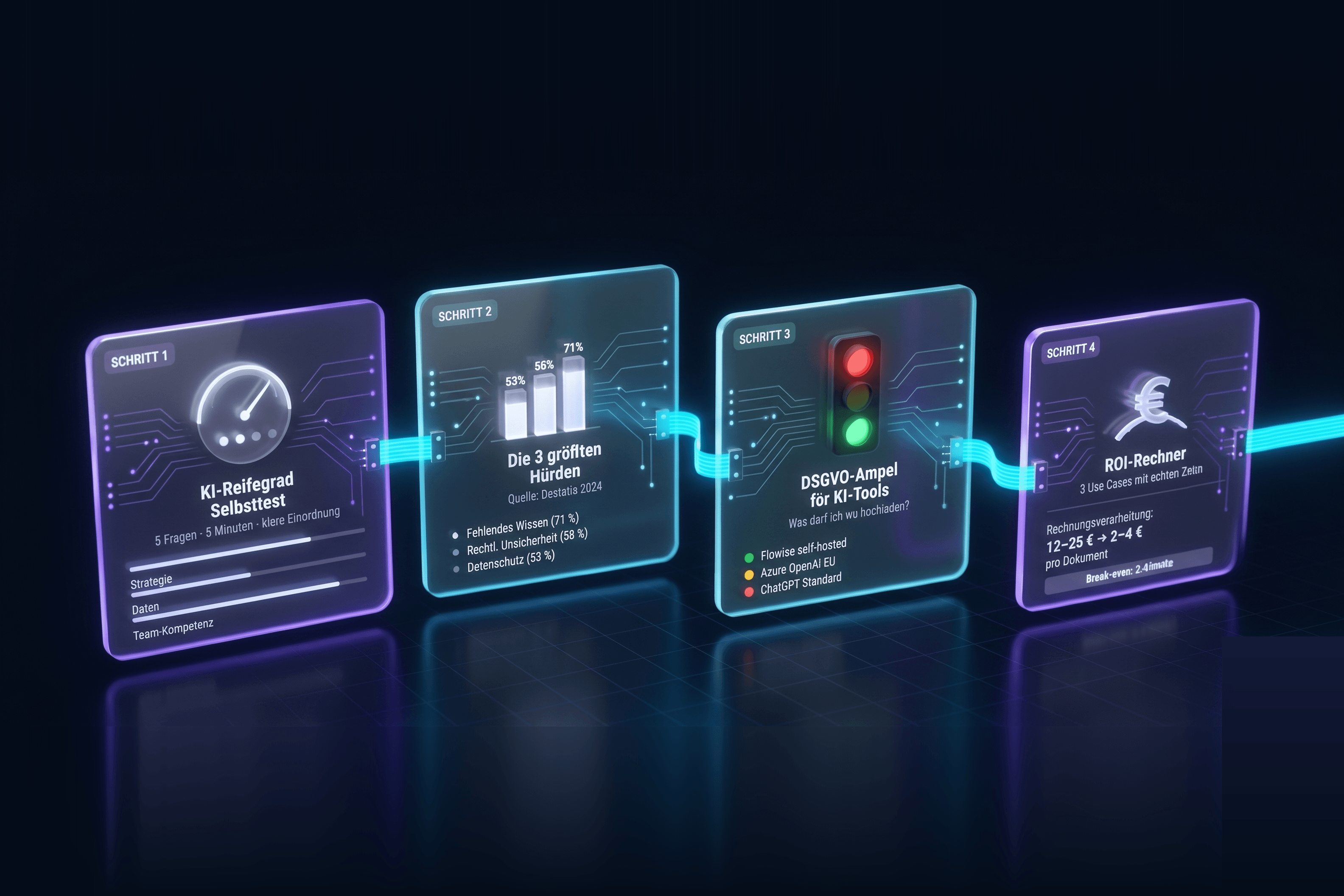
Before you pick a tool or define a use case, you need an honest picture of where your organization stands today. The five questions below give you a clear readiness score in five minutes.
Score each question 0, 1, or 2 points:
| Question | 0 points | 1 point | 2 points |
|---|---|---|---|
| Have your employees already used AI tools personally? | No / unsure | A few have | Yes, many have |
| Are your internal processes documented? | Barely | Partially | Mostly yes |
| Is there a clear owner for digital transformation? | No | It’s a side job | Yes, dedicated role |
| Do you have access to structured internal data? | No | Siloed | Yes, accessible |
| Is leadership actively interested in AI? | No | Open but passive | Yes, actively driving it |
Results:
- 0–3 points — Beginner: Start with one tightly scoped pilot in a single team. No company-wide rollout yet.
- 4–6 points — Building: You’re ready to scale early wins. Focus on change management and skill development.
- 7–10 points — Ready to Scale: Define an AI roadmap and prioritize use cases by ROI.
Step 2: The three biggest barriers — and how to clear them
Germany’s Federal Statistical Office surveyed the leading barriers to AI adoption across German businesses. The results explain why so many well-intentioned AI projects stall out:
| Barrier | Share of affected companies | What actually helps |
|---|---|---|
| Insufficient knowledge of AI capabilities | 71% | Practical team workshops, hands-on demos |
| Legal and regulatory uncertainty | 58% | Data privacy guide (see below), DPA agreements with vendors |
| Data privacy concerns | 53% | Categorize your data before choosing a tool |
(Source: Federal Statistical Office / Destatis, November 2024)
The critical insight: all three barriers are not technical problems. They’re knowledge, communication, and trust problems. Solving them with another tool rollout doesn’t work.
Step 3: The AI Readiness Model — why technology is only 16% of the equation
Drawing on the Prosci study (n=1,107) and supporting McKinsey analysis, a clear pattern emerges: successful AI rollouts in small and mid-sized businesses follow a three-pillar model that goes far beyond tool selection.
Pillar 1: Strategy (What do we actually want?) Define a concrete use case — not an abstract goal. Not “we want to use AI.” Instead: “We want our customer service team to categorize incoming emails in under two minutes and respond with a drafted reply template.”
Pillar 2: People (Who’s doing this with us?) 79% of SME leaders say their employees have no foundational AI skills (DMB/Salesforce AI Index for SMEs, February 2025, n=526). The solution isn’t a mandatory webinar. It’s 3–5 internal champions who test the use case themselves, refine it, and model the behavior for the team.
Pillar 3: Data and Processes (What does the AI work with?) AI is only as good as the data it receives. Before choosing a tool, ask: What data do we have? In what format? Who can access it?
Step 4: Quick-Win Matrix by Industry — where should you start?
No competitor article does this: a concrete, industry-specific breakdown of AI applications ranked by the best effort-to-value ratio for SMEs.
Retail and E-Commerce
| Use Case | Tool Category | Time to Implement | Estimated Monthly Savings |
|---|---|---|---|
| Automate product descriptions | Generative AI (ChatGPT, Claude) | 1–3 days | 15–30 hrs editorial time |
| Summarize customer reviews | AI summarization | 1 day | 5–10 hrs analysis time |
| Personalized email campaigns | AI + CRM integration | 1–2 weeks | +10–25% open rate |
| Chatbot for product questions | RAG chatbot | 2–4 weeks | 20–40% fewer support tickets |
Trades and Construction
| Use Case | Tool Category | Time to Implement | Benefit |
|---|---|---|---|
| Speed up quote creation | Generative AI with templates | 1–2 days | 60–80% faster |
| On-site documentation | AI dictation + structuring | 1 day | Frees up field staff |
| Materials planning | AI-assisted analysis | 2–3 weeks | Fewer ordering errors |
Manufacturing
| Use Case | Tool Category | Time to Implement | Benefit |
|---|---|---|---|
| Automate quality documentation | AI + OCR + structured output | 2–4 weeks | 70% less manual data entry |
| Invoice processing | AI document processing | 1–2 weeks | Cost: $15–30 → $2–5 per document |
| Maintenance log analysis | RAG on machine data | 3–6 weeks | Early detection of failures |
Professional Services and Consulting
| Use Case | Tool Category | Time to Implement | Benefit |
|---|---|---|---|
| Automate meeting notes | AI transcription (e.g. Fireflies) | Immediate | 30–60 min saved per meeting |
| Create proposals and reports | Generative AI with company profile | 1–3 days | 50–70% faster |
| Internal knowledge management | RAG knowledge base | 2–4 weeks | Fewer internal questions |
Step 5: Data Privacy Guide for AI Tools — what can you upload where?
This is the question every SME asks — and almost no guide answers it concretely. Here’s an honest breakdown of the most common tools by data sensitivity:
Categorize your data first
Before choosing a tool, categorize what you’re working with:
| Data Category | Examples | Risk Level |
|---|---|---|
| Public information | Product descriptions, general FAQs | Low |
| Internal operational data | Process docs, general company knowledge | Medium |
| Business contract data | Customer contracts, pricing, terms | High |
| Personal data | Customer records, employee data | Very high |
| Sensitive special categories | Health, financial, legal records | Critical |
Data Privacy Guide: which tool for which data?
| Tool | Public | Internal | Contracts | Personal Data | Sensitive Categories |
|---|---|---|---|---|---|
| ChatGPT (standard) | 🟢 | 🟡 with DPA | 🔴 | 🔴 | 🔴 |
| Claude API + DPA | 🟢 | 🟢 | 🟡 | 🟡 | 🔴 |
| Microsoft Copilot (M365) | 🟢 | 🟢 | 🟡 | 🟡 | 🔴 |
| Azure OpenAI (US/EU region) | 🟢 | 🟢 | 🟢 | 🟡 | 🟡 |
| Flowise / Dify (self-hosted) | 🟢 | 🟢 | 🟢 | 🟢 | 🟡 |
| Ollama + local model | 🟢 | 🟢 | 🟢 | 🟢 | 🟢 |
🟢 Safe to use | 🟡 Possible with proper agreements (DPA, privacy review) | 🔴 Not recommended
Step 6: ROI Calculator — what does AI actually deliver?
One of the biggest content gaps among competing guides: real numbers. Here are three use cases with realistic benchmarks.
Use Case 1: Automate invoice processing
| Metric | Without AI | With AI |
|---|---|---|
| Cost per invoice (intake, review, posting) | $15–30 | $2–5 |
| Processing time per invoice | 8–15 min | 1–2 min |
| Error rate | 3–5% | under 1% |
| Break-even (at 200 invoices/month) | — | approx. 2–4 months |
(Benchmarks: Ardent Partners AP Automation, Billentis 2024)
Your calculation: Monthly invoices × (old cost – new cost) – tool cost = monthly savings
Example: 300 invoices × ($22 – $3.50) – $250 tool cost = $5,300 monthly savings
Use Case 2: Customer service email handling
| Metric | Without AI | With AI |
|---|---|---|
| Average response time | 4–8 hours | 30–60 minutes |
| Handling time per ticket | 12–20 min | 3–5 min |
| Customer satisfaction (NPS effect) | Baseline | +15–25% |
| Staff needed for 100 tickets/day | 3–4 | 1–2 |
Use Case 3: Proposal creation
| Metric | Without AI | With AI |
|---|---|---|
| Time per proposal | 45–90 min | 10–20 min |
| Proposals per week (1 employee) | 8–12 | 25–35 |
| Quality / consistency | Variable | Standardized |
(Source: Deloitte AI Institute 2026, n=3,235)
The 3-Mistake Pattern: why so many SME AI projects fail
From our work with small and mid-sized businesses — and from the academic research on AI adoption — a clear pattern emerges. We call it the “3-mistake pattern.” Almost every failed AI project contains at least two of these three mistakes.
Mistake 1: Tool before goal The company buys an AI license because everyone else is — without first defining which specific problem they want to solve. No clear goal means no success metric, and no success metric means the project quietly dies after three months.
The fix: Define the use case first. Then find a tool. Not the other way around.
Mistake 2: Rollout without champions AI gets distributed to all employees via email. Nobody demonstrates how to use it. Nobody fields questions. Anyone who’s nervous about the tool just ignores it.
The fix: Identify 2–3 internal champions from within the team — people who test the use case, refine it, and model it for colleagues. According to Prosci, this approach increases adoption rates by an average of 45%.
Mistake 3: Pilot as endpoint The pilot works. But it never scales. Nobody defined what “success” looks like. There’s no roadmap for what happens next.
The fix: Define upfront: which metric determines whether the pilot succeeded? What happens after — scale up or shut down? Who makes that call?
Building AI skills: what your team actually needs
79% of SME leaders say their employees have no foundational AI skills. That sounds daunting — but it’s actually a precise description of a solvable problem.
What employees do NOT need:
- Learning to code
- Understanding statistics or machine learning
- Knowing every AI tool in detail
What employees DO need:
- Understanding what generative AI can and can’t do (hallucinations, limitations)
- Writing prompts that produce useful outputs
- Critically reviewing outputs before using them
- Knowing which data they’re allowed to upload
A practical onboarding path for your team:
- 90-minute workshop with your team: live demo of the defined use case
- 2-week trial period with one clearly scoped application
- Feedback session after week 2: what works, what doesn’t, what’s missing?
- Appoint internal champions to carry the knowledge forward
The right start: a 4-week roadmap
Instead of a generic checklist — a concrete plan for your first four weeks.
Week 1: Find your focus
- Brainstorm with your team: which tasks eat the most time?
- Pick the top 3 use cases and rank them by ROI potential
- Clarify the data categories involved in use case #1 (apply the privacy guide)
Week 2: Set up the pilot
- Choose a tool for use case #1 and configure it (no monthly budget needed — most tools offer a free trial)
- Name 2–3 champions from your team
- Test the first version of the use case live
Week 3: Measure and adjust
- Champions document what’s working and what needs improvement
- Measure time savings or quality gains concretely
- Optimize your system prompt or configuration
Week 4: Decide and scale
- Compare results against the success metric you defined in week 1
- Decision: scale to the full team, expand to another department, or move to the next use case?
- Pull the next use case off your priority list
Frequently asked questions
What does “using AI the right way” actually mean for a small business? It means choosing a clearly defined use case, involving your team, respecting data privacy requirements, and measuring success concretely — rather than buying tools and hoping someone figures it out.
Which AI tools work best for SMEs? It depends on the use case. For writing and communication: ChatGPT (OpenAI) or Claude (Anthropic). For internal knowledge bases: Dify or Flowise with RAG. For workflow automation: n8n with AI nodes. For Microsoft-first environments: Microsoft Copilot.
Can SMEs implement AI without an IT department? Yes — for the most important use cases, you don’t need an in-house IT team. Tools like ChatGPT Custom GPTs or Dify are designed to be configured without coding knowledge. For more complex integrations, partnering with a specialized service provider is the practical path.
How much does AI cost for a small business? The simplest entry point (ChatGPT Plus or Claude Pro) runs $20–25/month per user. A structured RAG solution with your own knowledge base is achievable from $60–300/month. For most businesses, the investment pays back within 2–4 months.
What should you do if employees resist AI? First, understand why. Common causes: fear of job displacement, feeling overwhelmed, not enough time to experiment. Counter-approaches: pick champions from within the team (not a top-down mandate), demonstrate concrete relief from tedious tasks (not abstract future promises), and be honest about AI’s limitations.
Can I put customer data into ChatGPT? Without a signed Data Processing Agreement with OpenAI and without enabling privacy mode, processing personally identifiable customer data through ChatGPT may violate applicable privacy regulations. For sensitive customer data, use regionally-hosted or self-hosted solutions.
What’s the difference between using AI and implementing AI? Using AI means individual employees occasionally use a tool on an ad-hoc basis. Implementing AI means systematically integrating a use case into a workflow, measuring it, and scaling it. Only implementation creates lasting business value.
How long before AI is really working in a company? First quick wins are achievable in 1–4 weeks. A fully scaled, well-integrated AI practice that’s part of the daily workflow typically takes 3–6 months — not because of the technology, but because of the human side of adoption.
Conclusion: Start focused — scale deliberately
The most common mistake isn’t moving too slowly. It’s starting with the wrong step — a tool instead of a use case, a rollout instead of a pilot, a slide deck instead of a live demo.
What you can do right now:
- Take the AI Readiness Assessment from Step 1 — five minutes, clear picture
- Pick a use case from the quick-win matrix that fits your industry
- Check the data privacy guide for the tool you’re considering
- Start a 4-week pilot with 2–3 champions from your team
You don’t need a computer science background, your own AI team, or a seven-figure budget. You need a clear focus, a concrete goal — and the willingness to take the first step.
Ready to implement AI in your business?
Lass uns gemeinsam schauen, was wir für deinen Online-Shop herausholen können.
Sources
- Federal Statistical Office (Destatis): AI usage in German companies, 2024
- Prosci: Change Management in AI Initiatives (n=1,107)
- DMB / Salesforce: AI Index for SMEs, February 2025 (n=526)
- Deloitte AI Institute: State of Generative AI 2026 (n=3,235)
- Mittelstand-Digital: AI tools for SMEs
- Ardent Partners: AP Automation Benchmarks 2024
- Billentis: E-Invoicing / E-Billing Report 2024